Bluetooth Low Energy with CircuitPython on a nRF52840 USB Dongle
This tutorial outlines how to configure the nRF52840 USB dongle as a CircuitPython device .
Unfortunately, the dongle’s default bootloader used with the nRF Connect desktop app will not allow you to flash the required bootloader for CircuitPython. Instead, we’ll have to use the nrfjprog command line tool and an external JLink programmer.
We’ll focus on using the nRF52840 Development Kit ’s JLink programmer.
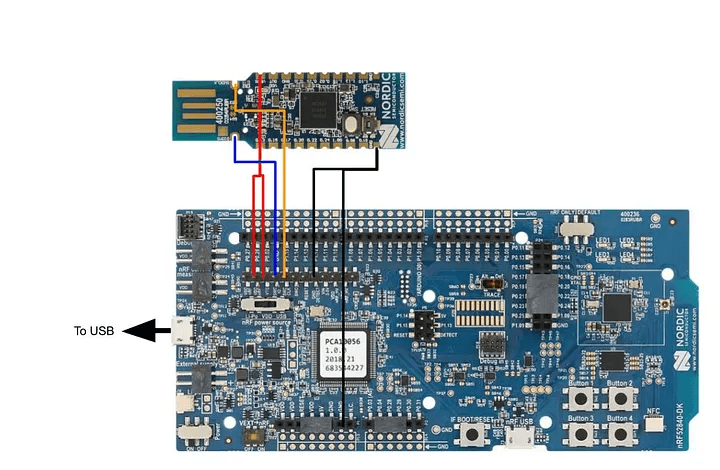
Using the P20 header on the development kit, make the connections shown below:
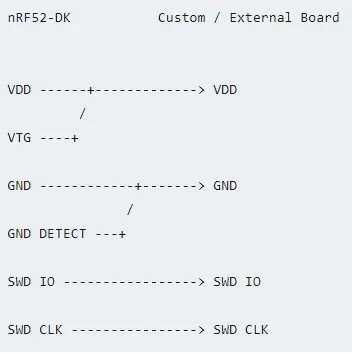
The power to our target board (USB Dongle) is provided by the VDD pin on connector P20 of the development kit.
If you’re on Windows, we must disable MSD Support on the dev kit’s built in JLink. This causes a conflict with the CDC serial communication. To do this, run J-Link Commander and execute the command:
MSDDisableThis can be reverted later by running MSDEnable
Once your hardware connections are made, install the nrfjprog tool by Nordic .
This allows you to access the JLink programmer in your command line. Once installed, open up a command prompt and confirm a successful installation by running this command:
nrfjprog --versionThe system should respond with the tool and driver version. You may need to add the nrfjprog tool to system PATH.
Erase the contents of your USB Dongle by running the following command in your command prompt:
nrfjprog --family nrf52 --eraseallIf you receive an error, double check your hardware connections. I had my nRF Dev. Kit’s power selection switch set to VDD.
Once the dongle has been successfully erased, download Adafruit’s PCA10059 nRF52840 Bootloader hex file to a convenient directory. I just stashed it on my desktop.
In your command line, change director into the directory where your hex file is stored. Run the command shown below:
nrfjprog --program <name of your hex file> --sectoranduicrerase -f nrf52 --resetIf the bootloader’s installation was successful, the USB dongle should now come up as the removable disk NRF52BOOT when plugged in.

To configure with CircuitPython, download the latest UF2 file for the PCA10059 .
Copy/drag the UF2 file to the removable disk. The NRF52BOOT should disconnect, then reconnect after a few seconds with the new name of CIRCUITPY.
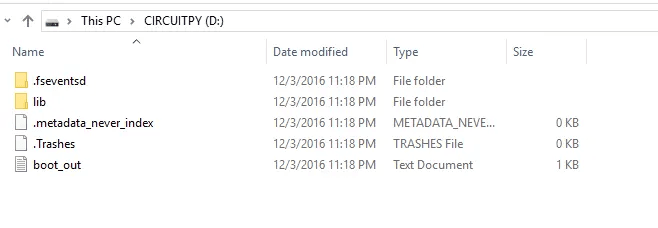
Adafruit has built a bunch of libraries for use with CircuitPython. In order to use Bluetooth LE, a library is required from the bundle .
Here’s some test code written by Rototron in his helpful tutorial :
import board
from pulseio import PWMOut
from adafruit_ble.uart import UARTServer
from adafruit_bluefruit_connect.packet import Packet
from adafruit_bluefruit_connect.color_packet import ColorPacket

r = PWMOut(board.LED2_R, duty_cycle=0)
g = PWMOut(board.LED2_G, duty_cycle=0)
b = PWMOut(board.LED2_B, duty_cycle=0)

uart_server = UARTServer()

while True:
    uart_server.start_advertising()
    while not uart_server.connected:
        pass
    while uart_server.connected:
        packet = Packet.from_stream(uart_server)
        if isinstance(packet, ColorPacket):
            print(packet.color)
            dc = [-257 * c + 65535 for c in packet.color]
            r.duty_cycle, g.duty_cycle, b.duty_cycle = dc